
Choosing the right Industrial Printing Systems is a production decision, not a simple equipment purchase. It affects throughput, color consistency, waste, labor, maintenance, and delivery reliability. A machine may look impressive in a showroom. Your actual substrate can tell a different story.
Industry research supports this caution. Smithers’ The Future of Digital Print to 2029 identifies packaging, labels, and customized production as important areas for digital print expansion. The 2024 drupa Global Trends report also highlights cost pressure, workflow efficiency, and sustainability as major concerns for print businesses. These findings suggest that buyers should evaluate complete workflows, not isolated printer specifications.
The practical test starts with the product in your hand. Examine ink adhesion on coated film, barcode clarity on corrugated board, and registration during long runs. Measure setup time, drying performance, energy use, and rejected sheets. Ask suppliers for verified samples and documented uptime data. Then compare service response times, operator training, software compatibility, and consumable costs.
The fastest system is not always the best system. A lower purchase price can hide expensive maintenance. A high-resolution press may struggle with your required speed. These are uncomfortable details, but they matter. Selecting Industrial Printing Systems requires production trials, lifecycle calculations, and honest discussion with operators. No report can replace that experience. Yet reliable industry data can reduce guesswork and create a stronger basis for investment.
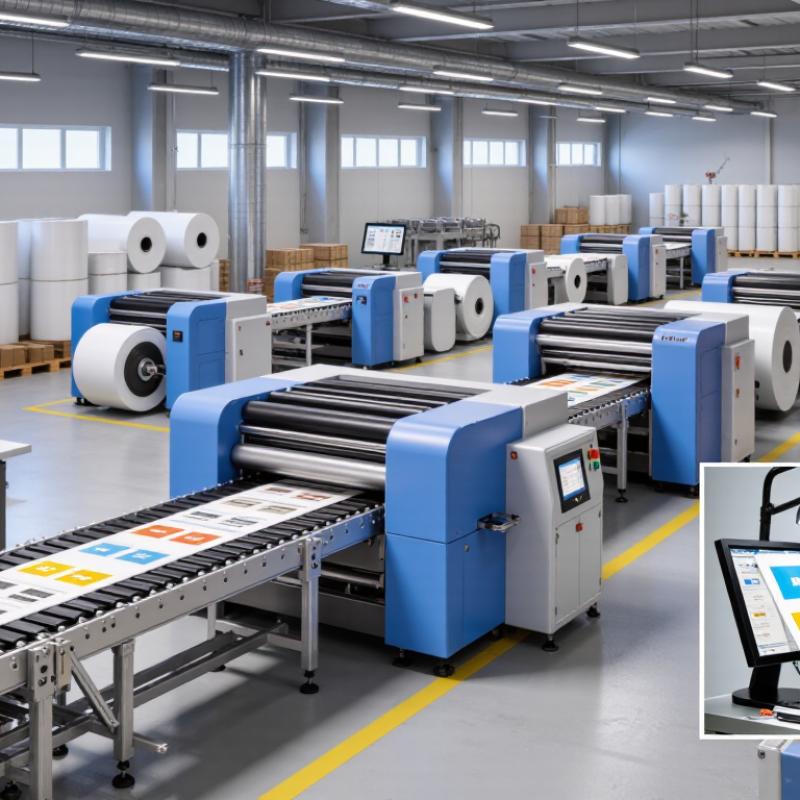
Choosing an industrial printing system begins with production requirements, not equipment specifications. Define the substrate, print width, image resolution, color demands, and daily volume. A system designed for 500 labels per shift may fail under continuous, multi-shift operation. Measure peak demand, not average demand.
Smithers’ The Future of Industrial Digital Printing to 2028 reports continued growth in digital industrial applications, driven by shorter runs, variable data, and faster product changes. These trends make workflow flexibility important. Record the required line speed, drying time, setup time, and acceptable waste. Also calculate the cost of ink, consumables, maintenance, labor, and unplanned downtime. A lower purchase price can hide higher operating costs. It happens often.
Tips: Test the actual production material before approval. Request samples showing fine text, solid fills, gradients, adhesion, scratch resistance, and drying performance. The test should use your real speed and curing conditions. Ask operators to review the interface, cleaning steps, and error recovery. Their experience can reveal practical weaknesses that a specification sheet misses.
The 2024 PMMI report on automation trends highlights labor constraints and the need for connected, efficient production equipment. Therefore, check whether the printer can exchange data with existing inspection, conveyor, and enterprise systems. Define uptime targets and service response times in writing. Include operator training and spare-part availability. I would also leave capacity for future product variants, because production plans rarely remain unchanged. Overestimating flexibility is costly, but underestimating it can stop a line.
| Production Application | Typical Substrates | Required Print Width | Typical Throughput | Recommended Resolution | Ink or Printing Process | Production Volume | Key System Requirements | Main Selection Considerations |
|---|---|---|---|---|---|---|---|---|
| Packaging and Labels | Coated paper, synthetic films, pressure-sensitive label stock, folding carton board | 200–760 mm | 20–80 m/min | 600–1,200 dpi | Water-based, UV-curable, or toner-based digital printing | Short to medium runs; frequent artwork changes | Fast job setup, accurate registration, variable-data capability, and inline inspection | Substrate compatibility, ink adhesion, color repeatability, drying time, and finishing integration |
| Corrugated Board | Uncoated linerboard, coated linerboard, single-wall and double-wall corrugated sheets | 1,200–2,500 mm | 4,000–12,000 m²/h | 300–600 dpi | Water-based pigment ink or conventional flexographic process | Medium to high volumes; repeat packaging orders | Large sheet handling, high ink laydown, robust feeding, and board-safe transport | Board thickness range, drying capacity, print durability, waste control, and line speed |
| Industrial Product Marking | Metal, plastic, glass, rubber, painted surfaces, and finished components | 5–100 mm print height | 30–300 m/min | 100–600 dpi | Continuous inkjet, thermal inkjet, laser, or other non-contact marking | Continuous production; high mark frequency | Rapid start-up, reliable operation, barcode support, and resistance to dust or vibration | Surface energy, marking contrast, solvent resistance, curing requirements, and integration with conveyors |
| Flexible Films | Polyethylene, polypropylene, polyester, laminates, and metallized films | 300–1,600 mm | 30–150 m/min | 600–1,200 dpi | Solvent, water-based, UV-curable, or electron-beam-compatible ink systems | Medium to high volumes; roll-to-roll production | Web tension control, precise registration, effective drying, and low-substrate-distortion handling | Film treatment, ink adhesion, residual solvent limits, drying energy, and lamination compatibility |
| Decorative and Interior Materials | Wood panels, decorative paper, ceramic surfaces, glass, metal sheets, and composite boards | 600–2,200 mm | 10–60 m/min | 600–1,200 dpi | Water-based pigment, UV-curable, or ceramic-compatible ink | Medium runs; customized designs and repeat patterns | High color gamut, surface alignment, durable curing, and accurate repeat-length control | Surface preparation, scratch and chemical resistance, color management, and curing footprint |
| Textile and Technical Fabrics | Polyester, cotton, blended fabrics, coated textiles, mesh, and nonwoven materials | 1,600–3,200 mm | 20–100 m/min | 600–1,200 dpi | Reactive, disperse, pigment, acid, or sublimation ink | Short to high volumes; design-driven production | Fabric transport control, pretreatment or post-treatment capability, and consistent penetration | Fiber type, color fastness, washing resistance, steaming or heat fixation, and wastewater requirements |
| Direct-to-Object Printing | Bottles, containers, panels, housings, promotional items, and irregular components | Up to 2,500 mm object length | 10–60 units/min | 600–1,200 dpi | UV-curable or specialty surface-adhering ink | Low to medium volumes; customized or serialized products | Robotic or precision positioning, height detection, curing control, and secure object handling | Object geometry, surface pretreatment, ink adhesion, curing access, and changeover time |
| High-Volume Transactional or Commercial Print | Uncoated paper, coated paper, envelopes, forms, and lightweight cards | Up to 560 mm | 50–150 m/min | 600–1,200 dpi | Electrophotographic toner or inkjet process | High volumes; personalized and versioned documents | Nonstop feeding, variable-data processing, automated quality checks, and stacker capacity | Page yield, media range, data-processing speed, color consistency, and finishing compatibility |
| Metal and Component Decoration | Aluminum, steel, coated metal, appliance panels, and industrial housings | 300–2,000 mm | 5–40 m/min | 600–1,200 dpi | UV-curable, solvent-based, or specialty two-component ink | Low to medium volumes; durable decorative graphics | Strong adhesion, controlled curing, dimensional accuracy, and chemical-resistant finishing | Corrosion protection, pretreatment, thermal sensitivity, coating thickness, and durability testing |
| Selection ranges are general industry planning values. Final specifications should be confirmed through substrate trials, production-speed testing, color validation, and total-cost-of-ownership analysis. | ||||||||